
ViewCompanion Standard
View, Print, Annotate, and Convert Technical Files
ViewCompanion Standard is a professional application for viewing, printing, and converting technical documents, CAD plot files, and engineering drawings.
It supports widely used formats such as PDF, DWF, PLT, HPGL, HP-GL/2, KIPGL, HP-RTL, Calcomp, CGM, and Gerber. Files can be viewed, printed, annotated, measured, compared, and converted without requiring the original CAD application.
ViewCompanion Standard is especially useful for working with plotter files created by CAD systems and plotter drivers. It provides accurate viewing and printing, together with practical tools for reviewing and processing technical drawings.
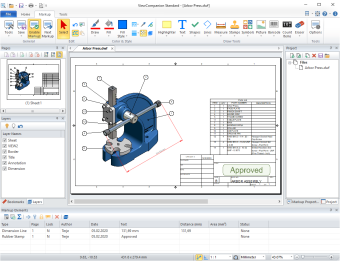
Click the image to see screenshots in full size.
Convert Technical Files to PDF, DXF, Images, and More
Convert documents and drawings to a wide range of vector, raster, CAD, and document formats. Supported output formats include PDF, PDF/A, DXF, DWF, SVG, TIFF, PNG, JPEG, WebP, Gerber RS-274X, HPGL/2, CGM, and many others.
Both individual files and groups of files can be converted using predefined settings, making ViewCompanion suitable for everyday conversion tasks as well as larger batch-processing workflows.
PDF, DWF, and SVG are widely used formats for sharing and distributing technical drawings.
ViewCompanion can convert your PLT, Gerber, CGM and DWF files to Autodesk DXF format which you can read in any major CAD application.
ViewCompanion Standard can also convert PLT, Gerber, CGM, and DWF files to Autodesk DXF, allowing the converted drawings to be opened and edited in many CAD applications.
Measure Distances and Areas
Measure distances, dimensions, and areas using accurate tools with snap to drawing geometry. Measurement tools can also be calibrated to provide correct results when a drawing is not scaled at 1:1.
Annotate Documents and Technical Drawings
Add stamps, revision clouds, text notes, dimension lines, area measurements, barcodes, symbols, images, and other markup elements.
All annotations are stored in a separate markup file, leaving the original document unchanged. Markups can also be included when printing or converting the file.
Getting Started
New to ViewCompanion?
Visit the Getting Started page for a quick introduction to the interface and basic features.
Learn how to open files, navigate documents, and perform common tasks such as viewing, annotating, comparing, and converting them.
Key Features
- View, print, annotate and convert Adobe PDF files.
- View, print, annotate and convert PLT, HPGL, and HPGL/2 files.
- View, print, annotate and convert Autodesk DWF, CGM, Calcomp, and Gerber files.
- Convert your files to PDF, PDF/A, TIFF, CALS, DWF, DXF, PNG, JPEG, and other formats.
- Batch convert and batch print files in all supported formats.
- Compare two files and visualize the differences.
- Add markup using text, stamps, images, symbols, shapes, dimension lines, measurement areas, and more.
- Use the measurement and annotation tools to perform digital takeoffs directly from your drawings.
- View, convert and print documents in color, grayscale, or black and white.
- Scaled print or fit to paper.
- Poster mode for printing big format drawings on multiple paper sheets.
- Print in n-up mode, also known as multiple pages per sheet.
- Full-screen print preview.
- Add headers and footers containing the date, time, scale, and filename when printing.
- Add watermark using either text or a raster image to the printed document.
- Print to all Windows supported plotter and printer devices.
- Create custom pen tables to control colors, line styles, and line widths during printing and conversion. Pen tables can also be used for batch printing and batch conversion.
- Overlay up to 10 files and print as one drawing.
- Copy selected region to clipboard, and paste into another Windows application.
- Choose between ribbon, or a classic menu and toolbar based user interface.
- Use mouse-wheel for zooming and panning operations.
- DDE Interface for easy integration with other programs.
- Command line interface for conversion and printing.
- Store commonly used files in projects.
File Format Support
ViewCompanion Standard supports the following file formats for viewing and conversion:
- PLT, HPGL/2, KIPGL and HPGL plotter format
- HP-RTL (Raster Transfer Language)
- Adobe PDF (1)
- Autodesk DWF 2D
- Autodesk DWFx 2D
- Autodesk Inventor Drawings (IDW)(2)
- Calcomp Plotter Format
- CGM (Computer Graphics Metafile) (3)
- Excellon Drill Format
- Gerber RS-274D plotter format (Standard)
- Gerber RS-274X plotter format (Extended)
- Gerber X2 / X3
- With the Standard edition you may convert PDF files to the following formats: TIFF, CALS, GIF, HP-RTL, JPEG, JPEG XL, PCX, WebP and BMP.
You will need the Premium edition to do PDF to CAD conversion, e.g.: PDF to DXF. - Support for Autodesk Inventor IDW files requires Autodesk Apprentice Server to be installed on the same computer.
Download Autodesk Apprentice Server 2027 here — available free of charge. - Supports CGM files using binary and clear text encoding.
ViewCompanion Standard can convert files to the following formats:
- Adobe PDF
- Adobe PDF/A
- Adobe Postscript®
- Autodesk DWF
- Autodesk DXF
- AVIF Image Format
- CALS CCITT Group 4 Raster
- Computer Graphics Metafile
- Gerber RS-274X
- GIF Image Format
- HEIC Image Format
- HPGL/2
- HP RTL
- JPEG Image Format
- JPEG XL Image Format
- Paintbrush PCX
- Portable Network Graphics (PNG)
- Scalable Vector Graphics (SVG)
- TIFF Raster (1)
- WebP (Google Image Format for the WEB)
- Windows Bitmap (BMP)
- Windows Enhanced Metafile
- Windows Metafile
- Supported compression methods for TIFF include Uncompressed, CCITT Group 3, CCITT Group 4, LZW, Deflate (ZIP), JPEG, and PackBits.
- No additional applications or drivers are required to convert files between the supported formats.
Download ViewCompanion Standard
The downloaded product will run in evaluation mode for a period of 30 days.
If you want to continue to use the product after this period, you're required purchase a license.
Buy ViewCompanion Standard
Follow us


