
PDF Tools in ViewCompanion Premium
ViewCompanion Premium is a powerful PDF processing software solution for technical documentation, engineering drawings and professional document workflows. It includes tools for viewing, comparing, converting, merging, splitting, rotating, watermarking, securing, annotating and batch processing PDF files.
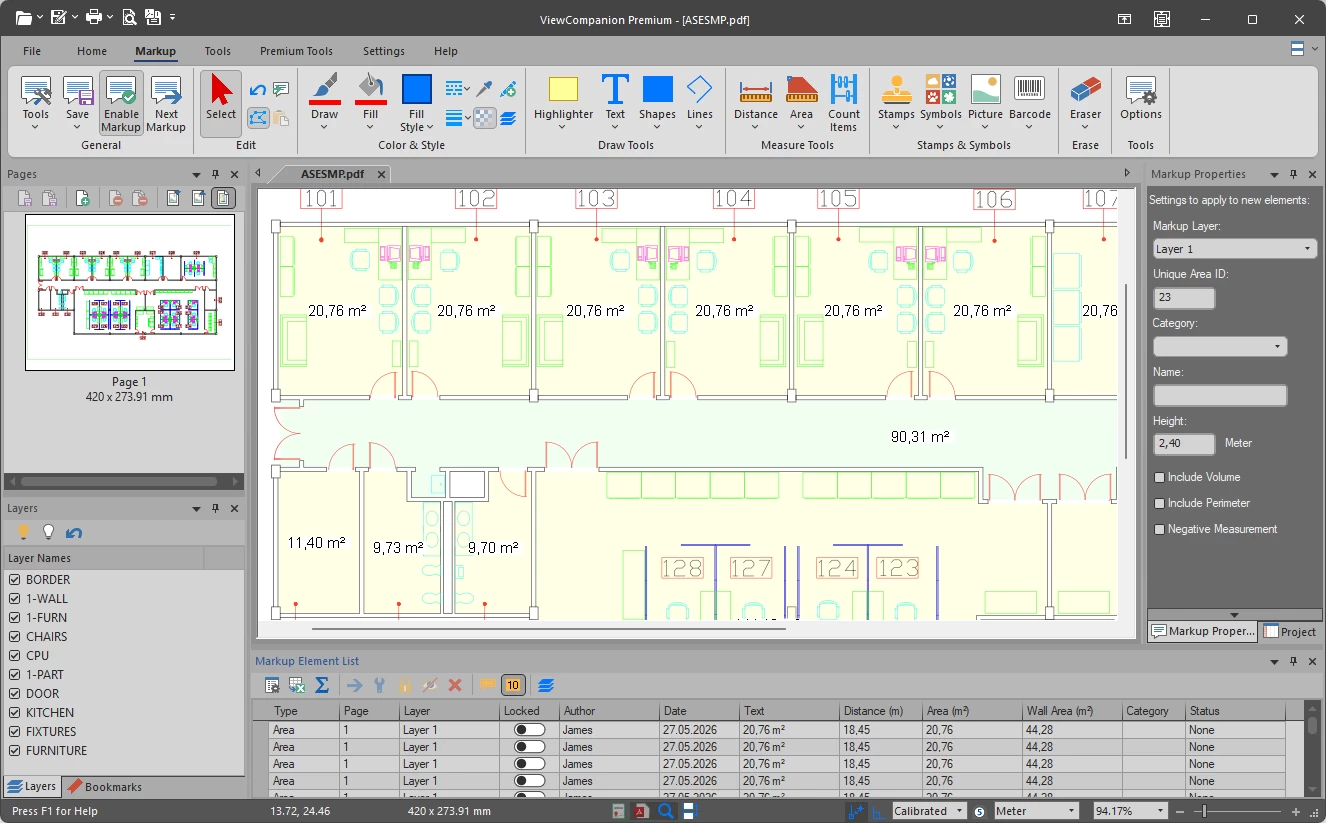
PDF Viewing and Navigation
Open and inspect PDF documents, scanned drawings, technical manuals and large-format engineering files. ViewCompanion Premium includes zooming, panning, page navigation, rotation and printing tools.
Fast PDF Viewing
Open standard PDF files and large technical drawings quickly and efficiently.
Navigation Tools
Zoom, pan, rotate and navigate between pages using intuitive viewing controls.
Printing Support
Print documents in full size or scaled output using Windows compatible printers.
PDF Feature Overview
| PDF Function | Supported in ViewCompanion Premium |
|---|---|
| PDF viewing and printing | Yes |
| PDF compare | Yes |
| PDF conversion | Yes |
| PDF/A conversion | Yes |
| OCR and searchable PDF creation | Yes |
| Watermarking | Yes |
| Encryption and security | Yes |
| PDF rotation | Yes |
| Batch rotation and orientation correction | Yes |
| Merge PDF and non-PDF files | Yes |
| Split multipage PDF files | Yes |
| Markup and annotation | Yes |
| Measurement tools | Yes |
| Batch processing | Yes |
| PDF digital signatures | Yes |
| PDF optimization | Yes |
| Add and delete PDF pages | Yes |
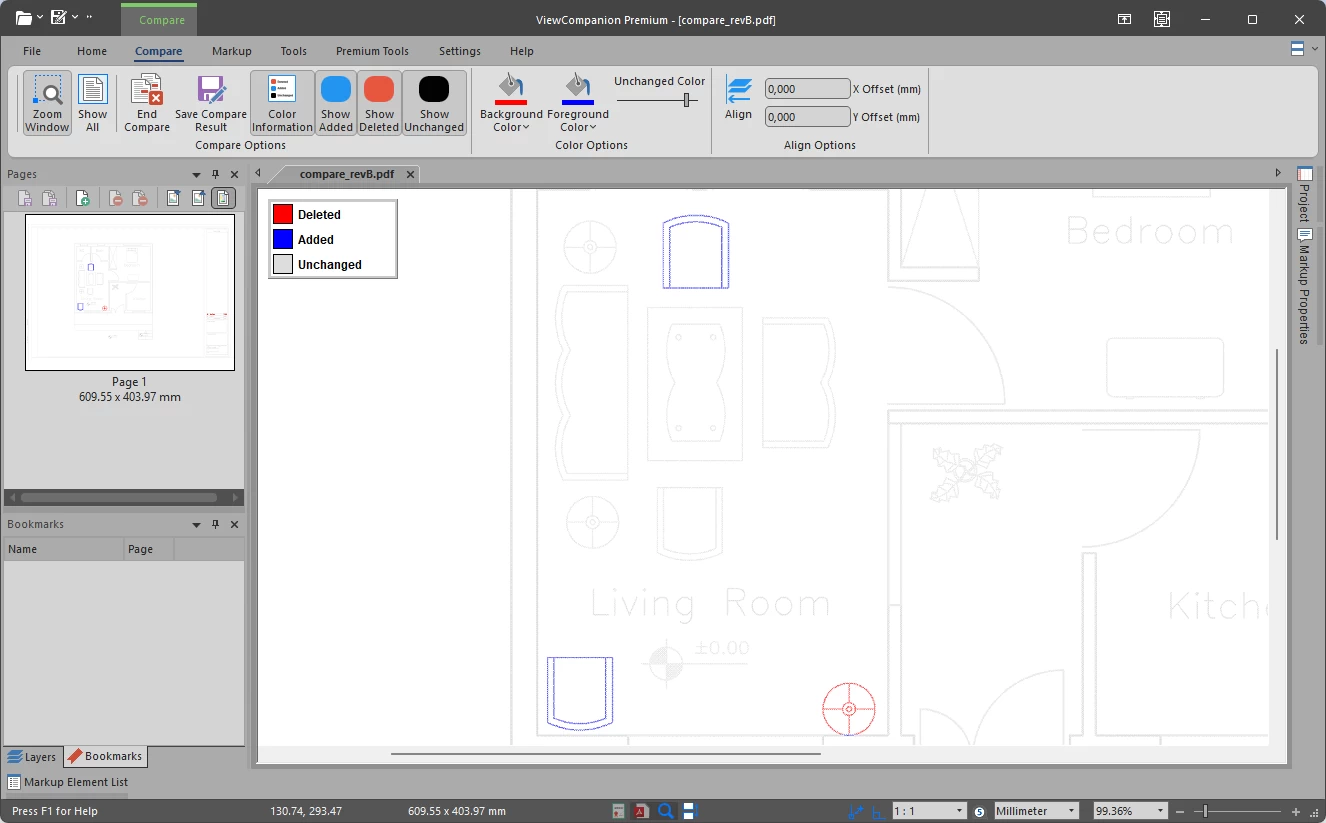
PDF Compare
ViewCompanion Premium can compare PDF files and generate a visual comparison result. This makes it easier to find changes between document revisions, drawing updates, technical documentation versions or exported PDF files.
PDF compare is especially useful when working with engineering drawings, CAD exports, construction documents, manufacturing documentation and reviewed document revisions. Instead of manually checking two PDF files page by page, ViewCompanion Premium can highlight visual differences so changes are easier to identify.
Comparison results can be used for review, documentation, quality control and revision checking workflows.
See also: Compare PDF, DWF and CAD drawings.
PDF Conversion
Convert PDF files to other formats such as TIFF, CALS, DWF, DXF, PNG, JPEG and more. PDF conversion can be performed on a single document or on multiple files using batch processing.
PDF/A Conversion
ViewCompanion Premium can convert PDF files to several PDF/A conformance levels, including PDF/A-1b, PDF/A-2b, PDF/A-3b, PDF/A-2u, PDF/A-3u, PDF/A-4 and PDF/A-4e. This is useful for archiving, long-term storage and document compliance workflows.
Learn more about PDF/A conversion in ViewCompanion Premium.
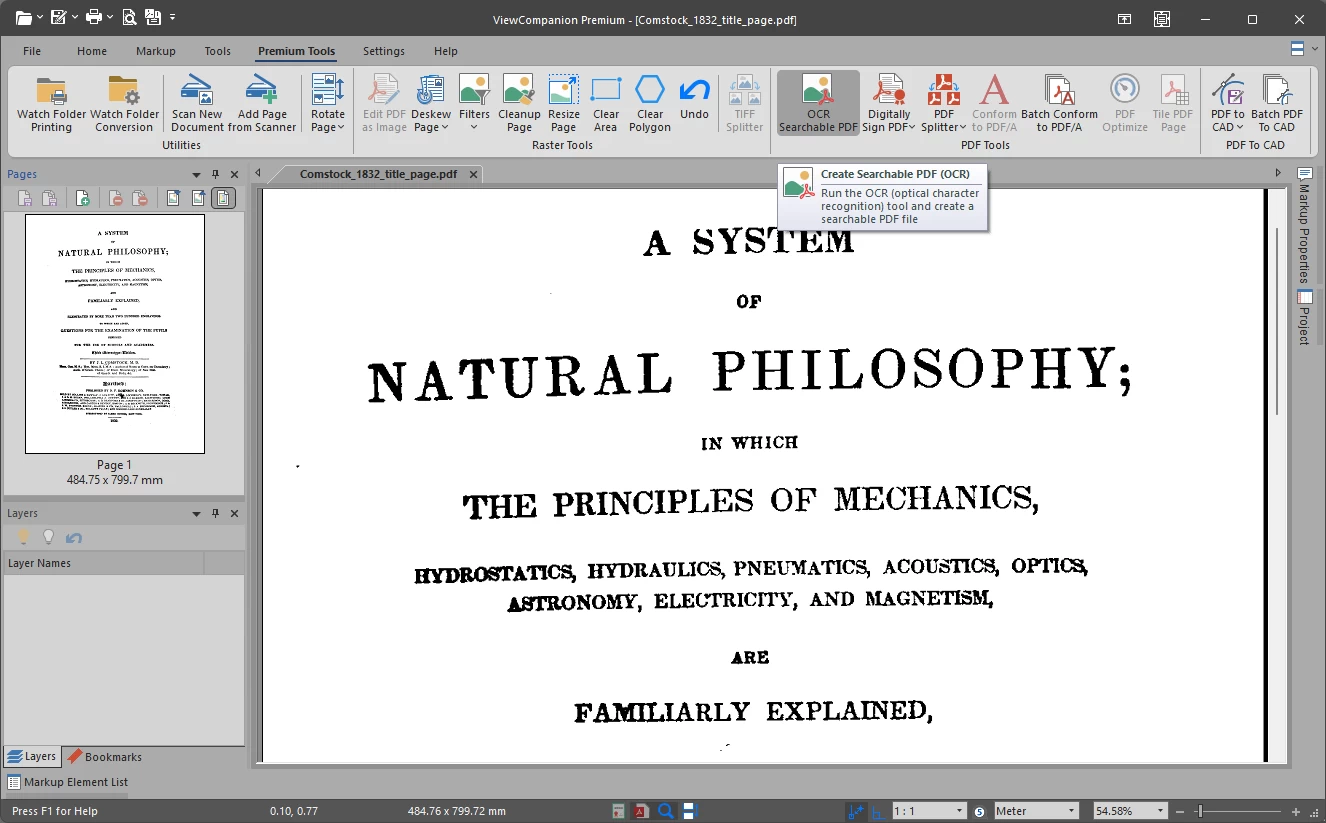
OCR and Searchable PDF Files
Use OCR to create searchable PDF files from scanned documents or image-based PDFs. This makes it easier to search, copy and archive document content.
OCR functionality is especially useful for scanned engineering drawings, archived paper documents and technical manuals.
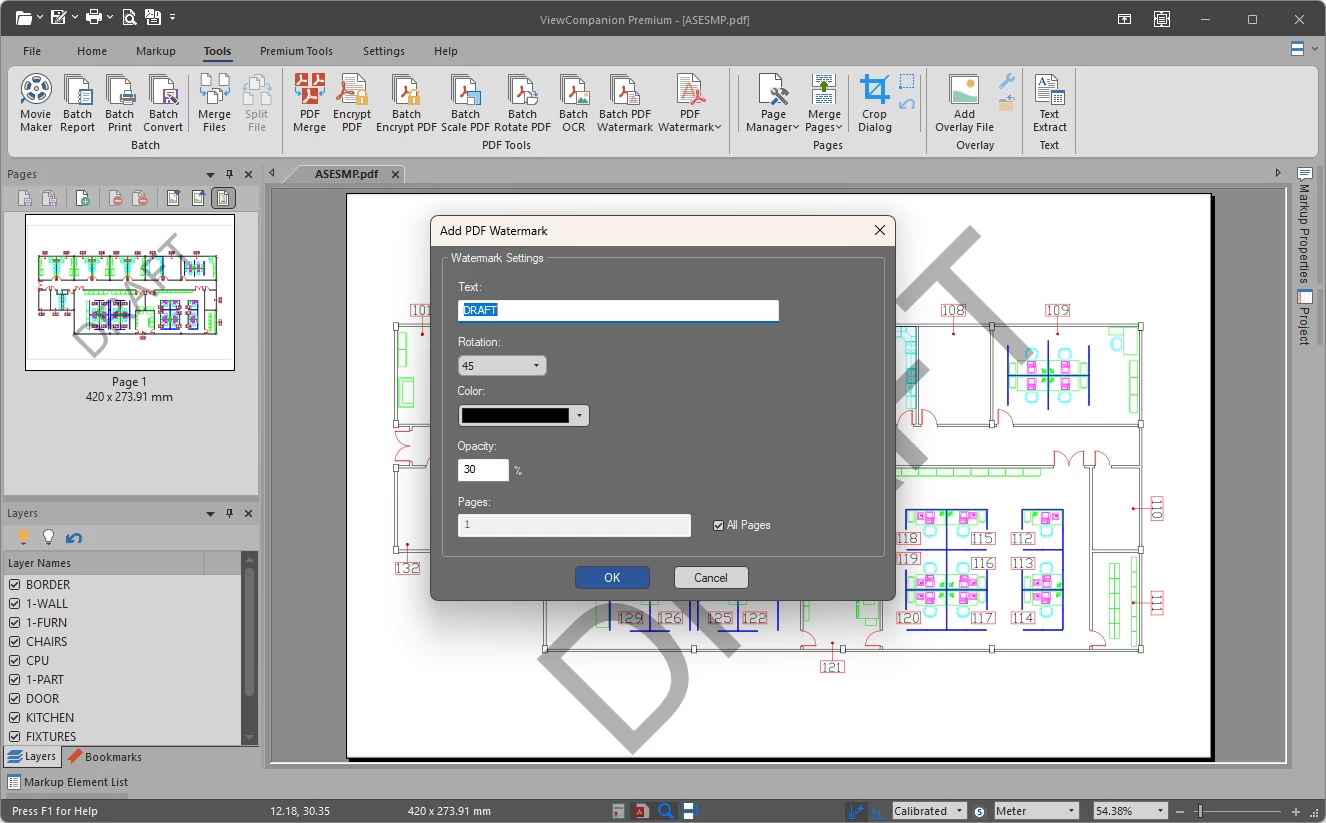
PDF Watermarking
Add text or image watermarks to PDF files. Watermarks can be used for document status, confidentiality labels, company branding, revision information or approval marks.
Watermarks can be applied to the active document, to multiple files using batch processing, or by using command line automation.
See also: How to add watermarks to PDF files.
PDF Encryption and Security
Protect PDF files by applying encryption and security settings. This can help control access to sensitive documents and reduce the risk of unauthorized changes.
PDF Rotation Tools
ViewCompanion Premium includes flexible PDF rotation tools for both individual documents and batch processing workflows.
You can rotate all pages in a PDF document to a selected angle, such as 90°, 180° or 270°. This is useful for correcting scanned documents, technical drawings or pages saved with the wrong orientation.
Batch processing tools also allow automatic page orientation correction. You can force all pages to landscape or portrait orientation, making it easy to standardize large collections of PDF files before printing, archiving or conversion.
Merge PDF Files
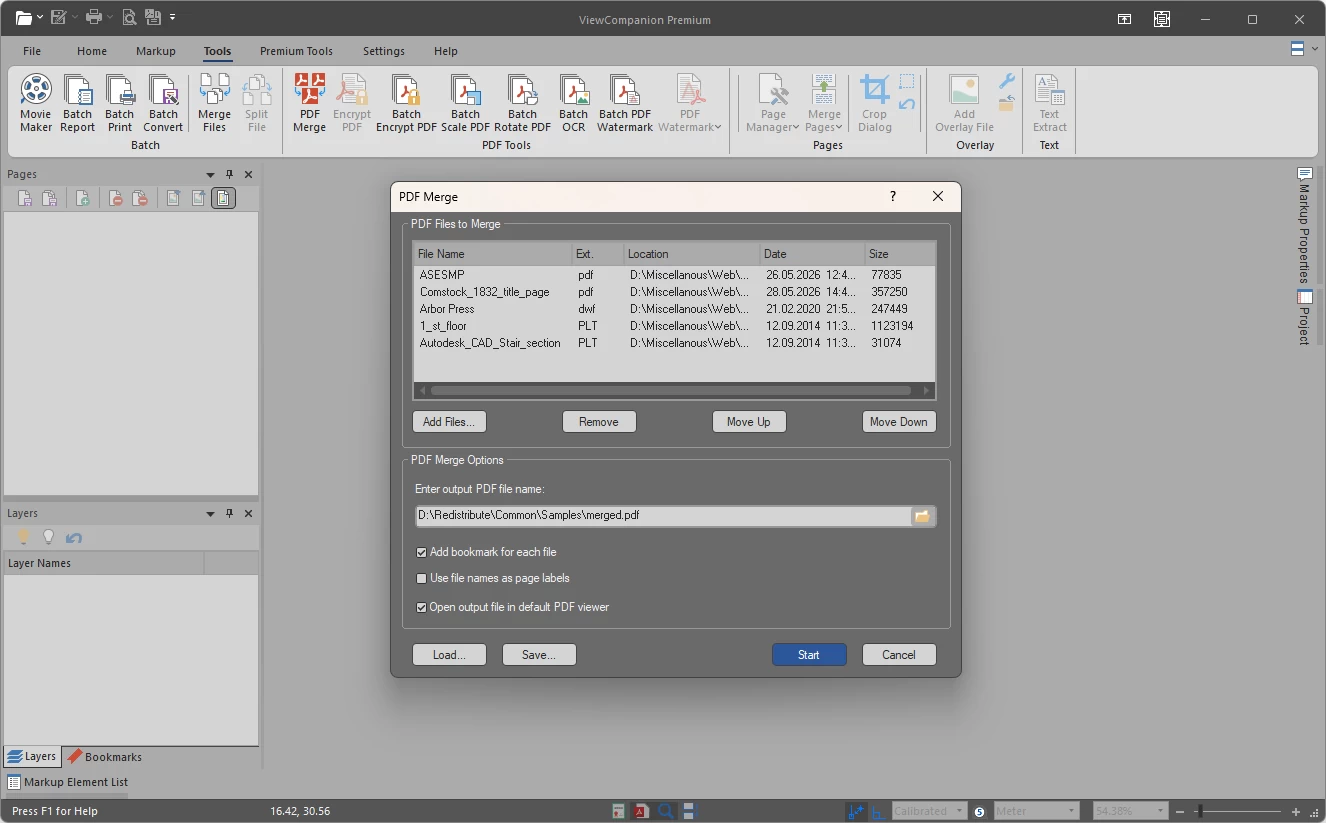
ViewCompanion Premium can merge multiple PDF files into a single PDF document. This is useful for combining reports, technical drawings, scanned documents, invoices or project documentation into one organized file.
You may also include non-PDF files in the merge process. Supported files can automatically be converted to PDF and inserted into the final merged document.
See also: Combine or merge PDF files.
Split PDF Files
ViewCompanion Premium can split multipage PDF documents into several smaller PDF files. PDF files can be split based on a selected number of pages or according to the output file size of the generated PDF documents.
Split operations are useful for scanned drawings, large reports, construction documentation and technical manuals.
Markup and Annotation Tools
Add markup elements such as text, arrows, lines, images, symbols, polygons and stamps. Markup can be used for review, comments, corrections and documentation workflows.
PDF Measurement Tools
Measure distances and areas directly in PDF drawings. This is especially useful for technical documents, CAD drawings, construction plans and engineering files.
Batch PDF Processing
Process many PDF files at once using batch tools. Batch processing can be used for conversion, printing, watermarking, OCR, rotation, merging, splitting and other repetitive PDF tasks.
Command Line and Automation
ViewCompanion Premium also supports command line operations for selected PDF tasks. This makes it possible to automate document workflows and integrate ViewCompanion into scripts or server-based processing routines.
For larger workflows, ViewCompanion Premium can also monitor folders and automatically process incoming PDF files using predefined conversion settings.
Typical PDF Workflows
- Compare two PDF drawings to find visual differences between revisions
- Convert scanned engineering drawings to searchable PDF files using OCR
- Merge project documentation into a single PDF file
- Create PDF/A files for long-term document archiving
- Batch rotate and watermark incoming PDF drawings
- Split large reports into smaller files for email distribution
- Convert PDF drawings to TIFF, CALS, DWF, DXF or image formats
- Apply encryption before sending sensitive PDF documents
Why Use ViewCompanion Premium for PDF Files?
- View and print PDF files, including large technical drawings
- Compare PDF files and identify visual differences
- Convert PDF files to many other formats
- Create PDF/A files for archiving
- Add watermarks to single files or batches
- Create searchable PDFs using OCR
- Encrypt and secure PDF documents
- Rotate PDF pages individually or in batch mode
- Force pages to landscape or portrait orientation automatically
- Merge multiple PDF and non-PDF files into a single PDF document
- Split large PDF files based on page count or output file size
- Add markup and review comments
- Measure distances and areas in technical drawings
- Automate repetitive PDF tasks
Related PDF Tools and Features
PDF Compare Tools
Compare PDF files, CAD drawings and technical documents to find visual differences.
PDF Watermark Tools
Learn how to add text and image watermarks to PDF files.
Merge or Combine PDF Files
Combine multiple PDF documents into a single PDF file.
PDF/A Conversion
Convert PDF files to archival PDF/A formats.
OCR and Searchable PDF
Create searchable PDF files using OCR technology.
ViewCompanion Premium
See the main product page for supported file formats and additional features.
Frequently Asked Questions
Can ViewCompanion Premium compare PDF files?
Yes. ViewCompanion Premium can compare PDF files and generate a visual comparison result, making it easier to find differences between document revisions.
Can ViewCompanion Premium convert PDF files?
Yes. ViewCompanion Premium can convert PDF files to several output formats, including image formats and technical drawing formats.
Can ViewCompanion Premium create PDF/A files?
Yes. ViewCompanion Premium supports several PDF/A conformance levels for long-term archiving and document preservation.
Can I add watermarks to PDF files?
Yes. You can add watermarks to the active PDF document, process multiple files using batch tools, or use command line options for automated workflows.
Can ViewCompanion Premium create searchable PDF files?
Yes. OCR can be used to recognize text in scanned or image-based PDF files and create searchable PDF documents.
Can ViewCompanion Premium rotate PDF pages?
Yes. ViewCompanion Premium can rotate PDF pages to different angles and also supports batch rotation of multiple files. You can additionally force pages to landscape or portrait orientation automatically.
Can ViewCompanion Premium merge PDF files?
Yes. ViewCompanion Premium can merge multiple PDF files into a single document. You may also include supported non-PDF files that are automatically converted during the merge process.
Can ViewCompanion Premium split PDF files?
Yes. Multipage PDF files can be split into smaller PDF documents based on page count or target output file size.
Can I process many PDF files at once?
Yes. ViewCompanion Premium includes batch processing tools for handling multiple PDF files efficiently.
Download ViewCompanion Premium
Try ViewCompanion Premium and explore advanced PDF viewing, comparison, conversion, OCR, watermarking, merge, split, rotation, encryption and batch processing tools.