
New in ViewCompanion
ViewCompanion 17.30: Fractional Measurements and Batch Page Splitting
ViewCompanion 17.30 introduces fractional display for US measurements and a new Batch Split Pages tool for quickly separating multipage documents.
These additions make technical measurements easier to read and simplify the processing of large collections of multipage files.
Display US Measurements as Fractions
Technical drawings created for US customary units often use inches and feet expressed as fractions rather than decimal values. A dimension such as 11.375 inches can now be displayed as the more familiar 11 3/8 inches.
Fractional measurements are especially useful when reviewing architectural drawings, construction plans, workshop drawings, and other documents where dimensions are commonly specified in halves, quarters, eighths, or sixteenths of an inch.
How to Enable Fractional Measurements
Fractional display is optional and is available when the US measurement system is active.
- Open the Settings tab, select Options, and then choose Application → General.
- Select US as the measurement system.
- Enable the option to display measurements as fractions.
- Select a denominator, such as 2, 4, 8, 16, 32, or 64, to control the displayed precision.
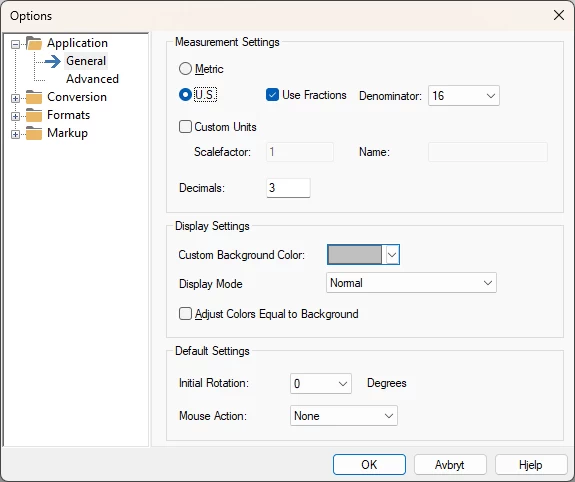
Control the Fraction Precision
The selected denominator determines how precisely a measurement is rounded for display. For example, selecting 16 displays values using the nearest sixteenth of an inch. A smaller denominator gives a simpler result, while a larger denominator provides finer precision.
New Batch Split Pages Tool
ViewCompanion 17.30 also adds a new Batch Split Pages tool. It can process a list of multipage files and create a separate output file for every page.
Instead of opening and splitting each document individually, you can add multiple source files and process the complete list in one operation. This is useful when individual drawing sheets or document pages must be archived, distributed, renamed, or processed separately.
Select one or more supported multipage files.
Select where the individual page files should be saved.
Choose PDF, TIFF, CALS, PNG, JPEG, or one of the other available output formats.
ViewCompanion creates one separate output file for each page.
Available in Version 17.30
The new measurement display and batch splitting functionality are included in ViewCompanion version 17.30. Existing customers with active maintenance can download and install the latest version.
Select your ViewCompanion edition below to view complete update information and download links: